Category Archives: Mysql

Ping Check for /24 ?

Well you can check which IP are in use using nmap

sudo nmap -sP -PR 212.122.161.*

It will scan entire /24 and show results

Device eth0 does not seem to be present, delaying initialization” Error

Device eth0 does not seem to be present, delaying initialization” Error’

Was getting this error after migrating centos 6 VM to new host

The best way to fix this isssue was deleting file rm /etc/udev/rules.d/70-persistent-net.rules

and rebooting vm.. Network was up and issue fixed

Test Post for WordPress

This is a sample post created to test the basic formatting features of the WordPress CMS.

Subheading Level 2

You can use bold text, italic text, and combine both styles.

  1. Step one
  2. Step two
  3. Step three

This content is only for demonstration purposes. Feel free to edit or delete it.

Change wordpress user password from CLI

If you are not able to login to wordpress admin and want to reset password

Follow below steps

Login to server as root user

Check database name in wp-config.php file

grep DB_NAME wp-config.php

mysql

use DB_NAME;

mysql> show tables;

+————————–+
| Tables_in_onlinesu_wp637 |
+————————–+
| wp_commentmeta |
| wp_comments |
| wp_links |
| wp_options |
| wp_postmeta |
| wp_posts |
| wp_swp_testimonial |
| wp_term_relationships |
| wp_term_taxonomy |
| wp_termmeta |
| wp_terms |
| wp_usermeta |
| wp_users |
+————————–+
13 rows in set (0.01 sec)

select * from wp_users;

Note down the username password you want to reset

and run below command to reset username password

mysql> UPDATE wp_users SET user_pass = MD5(‘Akaomxxx’) WHERE user_login =’username’ ;
Query OK, 1 row affected (0.01 sec)
Rows matched: 1 Changed: 1 Warnings: 0

Issues in emails after changing MX records cPanel

When user faces issues in email it due to domain MX pointing to remote server

in This case login to server and check domain entry whether in local or remote domains

grep domain.tld /etc/remotedomains

If domains name is not in /etc/remotedomains it will be in /etc/localhost

Change the domain MX record in zone file to fix this isssue

ONce MX records are changed run command /scripts/checkalldomainsmxs –yes

Now check the domain entries in grep /etc/remotedomains

The domain entry will be present in this file

Now remote emails should work fine

Reset bandwidth CWP

To reset bandwidth in CWP is tricky by changing package limits

Easier way to reset is resetting limits by below command

/scripts/cwp_api account reset_bandwidth username

The username is account username

Change strings in files in the same directory

To change string in one directory using sed

sed -i ‘s/kng.com/vtu.com/g’ *.db

This would a single command for all files in folder with extensio n.db

A DNS entry for “rexxxxxxl.com” already exists

The User had removed his addon domain from cPanel.

However while adding back there was wrror coming up “A DNS entry for “rexxxxxxl.com” already exists”

T The issue is likely due to leftover DNS configurations from removed domains. Running the /scripts/cleandns script should correct the issue.

Running command /scripts/cleandns fixed the issue 🙂

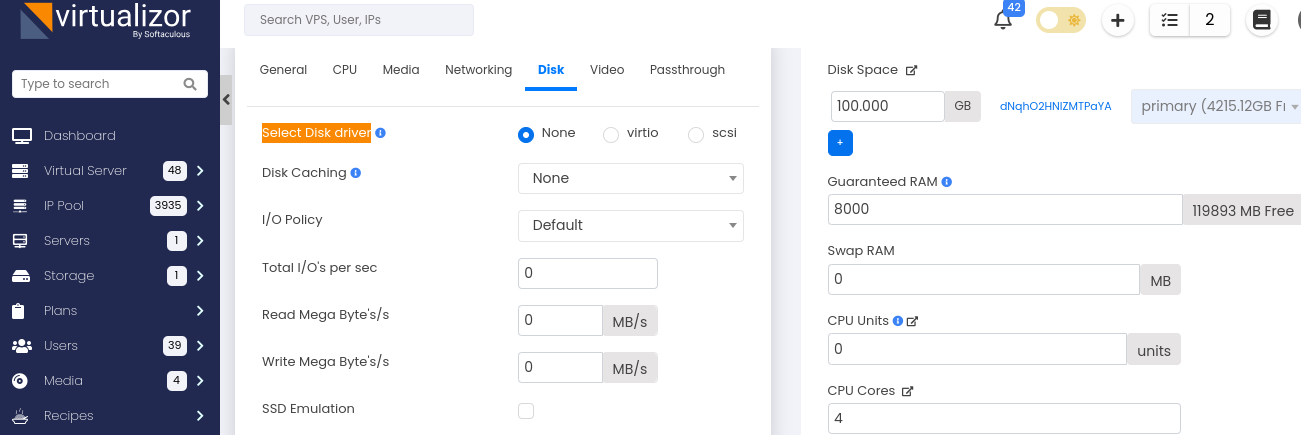
Disk not visible while installing windows OS ?

For those using virtualizor on Virtualizor software

If you face issues while installing windows and dont see disk

Go to edit VPS

Select Disk

Select Disk driver set to none

Which you can see in below image and reboot VPS

Disk will be visible

WHM logging out repetedly

If you are getting logged out repetedly from WHM

Go to

Home /
Server Configuration /
Tweak Settings

From there in security section check on Cookie IP validation

By defaut its set to strict.

Enable loose option and save.

This should fix this issue