Attached screenshot is the right way to setup outlook 2007/2010 in Centos 7 and cPanel
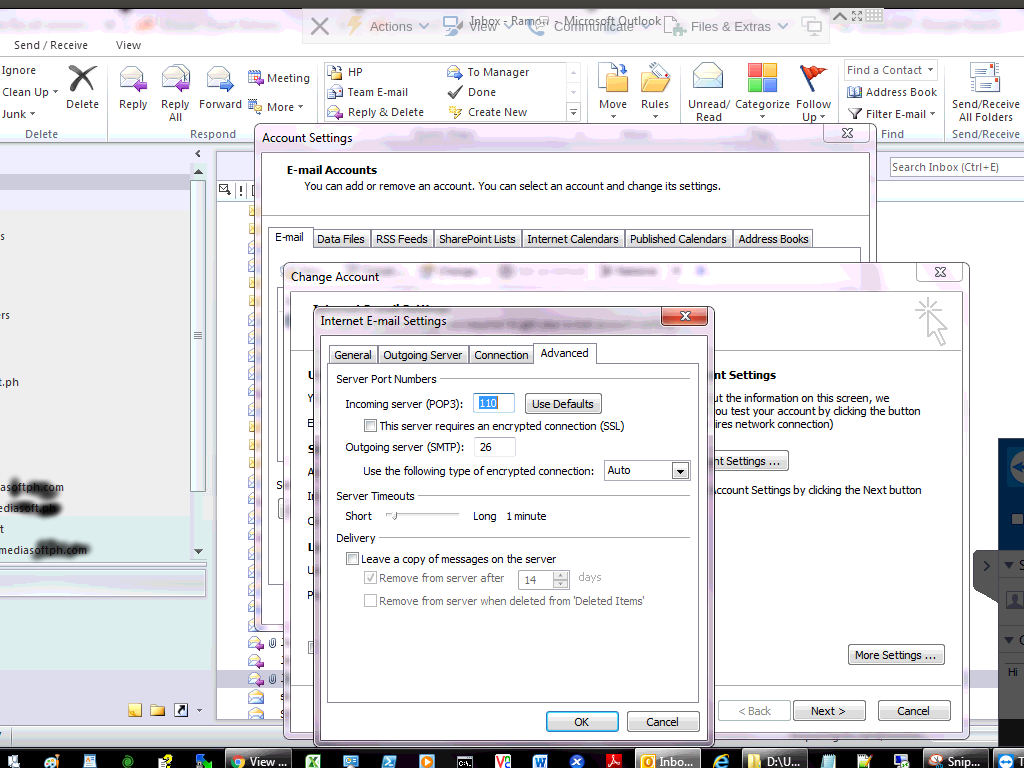
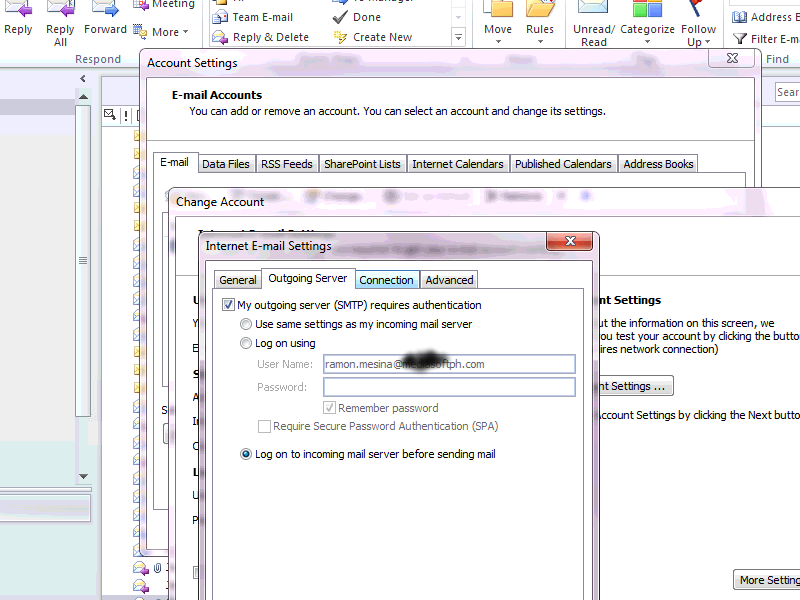

Attached screenshot is the right way to setup outlook 2007/2010 in Centos 7 and cPanel
This was a new issue which we came across while creating a Wimdows OS on KVM platform on Virtualizor
After several tries of creatng a VPS, We were able to make headway on this.
Scroll to bottom to find option Advanced Options
Here you will find option Enable virtio which is already check marked
Uncheck the Enable virtio option and save
You should be able to see disk space now while creating Windows VPS
Also in network settings select Virtual Network Interface Type select Realteck
This will make network start after the VPS in installed
if you get the below error
Access Denied
Unable to establish a PHP session.
The account must be able to write to the php session directory and must not exceed the assigned disk quota.
If
you believe that this is in error or inadvertent, contact your system
administrator and ask them to review your server settings.
Please check using following step
2. Check the permission and ownership of /home/$user/tmp folder. Set ownership as $user.
# chown $user:$user /home/$user/tmp
3. Set permission of the tmp folder to 755.
#chmod -R 755 /home/$user/tmp
4. Test now to see if PHPMyAdmin is working fine now…if the answer is no, go to next step….
5.Check to see if there is a file like /var/cpanel/overquota/blocks_$user and removed it.
6. rm /var/cpanel/overquota/blocks_$user
We had a issue in one of the virtualizor node
Where the server on rebooting the KVM VM were not starting
With error message being
error: Failed to create domain from /etc/libvirt/qemu/
error: Cannot get interface MTU on ‘viifbr0’: No such device
ON checking around found the issue with virtnetwork
Below command fixed the issue
service virtnetwork start
~]# service virtnetwork start
Bringing up viifbr0 – OK
Waiting for 10 seconds…1…2…3…4…5…6…7…8…9…10
Internet connectivity check successful viifbr0 – OK
Below are the commands which are to be used in centos 7 to open port 80

[root@onlinesupport ~]# firewall-cmd --permanent --zone=public --add-port=80/tcp success

[root@onlinesupport]# firewall-cmd --reload
While upgrading mysql in server make sure you make a backup of existing mysql
using commmand mysqldump --all-databases > all_databases.sql
Once you have complete backup , You can proceed with with upgrade of mysql.
Invalid command ‘<IfVersion’, perhaps misspelled or defined by a module not included in the server configuration
The above error is due to missing mod_version which needs to be added in apache using easyapache
it was fixed once the mod_version module was added
Please run the command given below to restart ipaliases in centos 7 server with cpanel
/usr/local/cpanel/etc/init/scripts/centos/ipaliases restart
| ip addr add | 198.xxx.xx.xx | dev enp6s0f0 label | enp6s0f0:1 | |||
| ip addr add | 198.xxx.xx.xx | dev enp6s0f0 label | enp6s0f0:2 | |||
| ip addr add | 198.xxx.xx.xx | dev enp6s0f0 label | enp6s0f0:3 | |||
| ip addr add | 198.xxx.xx.xx | dev enp6s0f0 label | enp6s0f0:4 | |||